
How to Use Plugins in WordPress


Plugins are one of the main reasons why WordPress is so popular. They allow you to add functionality to your website without the need for coding or technical knowledge. In this article, we'll discuss what plugins are, how to install and manage them, and some essential plugins that every WordPress site should have.
What are Plugins?
Plugins are small software programs that you can install on your WordPress site to add new features and functionality. There are thousands of free and premium plugins available in the WordPress repository, ranging from contact forms to eCommerce platforms.
According to recent statistics, there are over 60,000 plugins available in the WordPress repository, with more than 1.6 billion plugin downloads as of 2021. (Source: WordPress.org)
Some of the most popular WordPress plugins include Yoast SEO, with over 5 million active installations, Jetpack, with over 5 million active installations, and Contact Form 7, with over 5 million active installations. (Source: WordPress.org)
The use of plugins is a crucial part of the WordPress ecosystem, with 96% of all WordPress websites using at least one plugin. (Source: CodeinWP)
Plugins can enhance the functionality of WordPress sites in various ways, with eCommerce plugins like WooCommerce accounting for over 42% of all eCommerce websites worldwide. (Source: Datanyze)
Plugins can also improve site speed and performance, with WP Rocket users reporting up to a 50% improvement in site speed after installation. (Source: WP Rocket)
Plugins for Just About Everything
WordPress Plugin Categories |
|
|
|
How to Install WordPress Plugins
Installing WordPress Plugins from the Dashboard
- Log in to your WordPress Dashboard and navigate to the Plugins tab in the left-hand menu.
- Click on the "Add New" button at the top of the page to access the WordPress plugin repository.
- Browse through the available plugins or use the search function to find a specific plugin.
- Click on the "Install Now" button next to the plugin you want to install.
- Wait for the installation process to complete and then click on the "Activate" button to activate the plugin.
Activating and Deactivating WordPress Plugins from the Dashboard
- Log in to your WordPress Dashboard and navigate to the Plugins tab in the left-hand menu.
- Find the plugin you want to activate or deactivate from the list of installed plugins.
- To activate a plugin, click on the "Activate" button below the plugin name.
- To deactivate a plugin, click on the "Deactivate" button below the plugin name.
The Importance of Activating Plugins
Activating WordPress plugins is a necessary step in adding new functionality to your website. When you install a plugin, it is not automatically activated and made available to use on your site. Instead, you must activate the plugin in order to enable its features and functionality.
Activating a plugin essentially tells WordPress that you want to use that particular plugin on your site, and allows you to configure its settings and use its features. Once a plugin is activated, you can typically access its settings and options from the WordPress dashboard, and begin using its features on your site.
In addition to enabling a plugin's features and functionality, activating a plugin can also affect your site's performance and security. Some poorly coded or outdated plugins can cause conflicts with other plugins or your site's theme, resulting in errors or other issues. By activating only the plugins you need and keeping them up-to-date, you can ensure that your site remains fast, stable, and secure.
Updating WordPress Plugins from the Dashboard
- Log in to your WordPress Dashboard and navigate to the Plugins tab in the left-hand menu.
- Find the plugin you want to update from the list of installed plugins.
- If an update is available, a notification will appear next to the plugin name.
- Click on the "Update Now" button to update the plugin.
- Wait for the update process to complete and then click on the "Activate" button to activate the updated plugin.
- If you do not want to update a plugin, you can click on the "Ignore" link to dismiss the update notification.
Installing WordPress plugins from the dashboard is as simple as browsing the plugin repository and clicking the "Install Now" button. Activating and deactivating plugins can be done with a single click, and updating plugins is just as easy with the "Update Now" button.
Why Updating Your WordPress Plugins is Important
Updating plugins is important for several reasons. Firstly, updates often contain bug fixes and security patches, which help keep your site running smoothly and protect it from potential security threats. Outdated plugins can cause conflicts with other plugins or your site's theme, resulting in errors or other issues.
Secondly, updates can also include new features and functionality, which can improve your site's performance and user experience. By keeping your plugins up-to-date, you can take advantage of the latest improvements and stay ahead of the competition.
However, updating plugins can sometimes cause issues if you have an old WordPress version that is not compatible with the updated plugin. In this case, you may need to either update your WordPress version or use an older version of the plugin that is compatible with your WordPress version.
If you do need to use an older version of a plugin, it is important to note that this can potentially expose your site to security risks if the older version has known vulnerabilities. In this case, it may be necessary to find an alternative plugin that is compatible with your WordPress version and offers similar functionality.
Consider Backing Up Your Site Before Installing New Plugins
Before installing new plugins or themes on your WordPress site, it is always a good idea to backup your site to ensure that you can restore it in case anything goes wrong. Here are the steps to backup your WordPress site:
- Choose a backup method: There are several ways to backup your site, including using a plugin, using your hosting provider's backup service, or manually backing up your site files and database. For beginners, using a plugin is often the easiest option.
- Install and activate a backup plugin: There are many backup plugins available for WordPress, including UpdraftPlus, BackupBuddy, and Duplicator. Install and activate the plugin of your choice.
- Configure your backup settings: Depending on the plugin, you may need to configure your backup settings before you can perform a backup. This may include setting up a backup schedule, choosing a backup location, and selecting which files and database tables to backup.
- Perform a backup: Once you have configured your backup settings, perform a backup by clicking the backup button or scheduling a backup. The backup process may take several minutes or longer, depending on the size of your site.
- Verify your backup: After the backup process is complete, verify that the backup was successful and that you have a copy of your site files and database. You can do this by checking the backup location, or by restoring a backup to a test environment to ensure that everything works properly.
Can Too Many Plugins Impact Site Performance?
Too many plugins can negatively impact your site's performance. Each plugin adds code and functionality to your site, which can slow down your site's loading times and cause conflicts with other plugins or your site's theme. In addition, outdated or poorly coded plugins can cause errors or security vulnerabilities that can harm your site.
What About Plugin Conflicts?
Plugin conflicts can occur when two or more WordPress plugins have conflicting code or functionality, causing errors or issues on your site. These conflicts can manifest in various ways, such as broken functionality, error messages, or even site crashes. Plugin conflicts can be frustrating and time-consuming to troubleshoot, but it is important to address them quickly to prevent further issues and ensure that your site remains stable and functional.
How to Troubleshoot Plugin Conflicts
- Deactivate all plugins: If you are experiencing issues with your site, start by deactivating all of your plugins to see if the problem goes away. If the problem disappears, then one of your plugins is likely causing the issue.
- Reactivate plugins one by one: Reactivate your plugins one at a time, testing your site after each activation to see if the issue returns. This will help you identify which plugin is causing the conflict.
- Check for compatibility issues: If you identify a plugin that is causing conflicts, check to see if it is compatible with your site's theme and other plugins. Sometimes, plugins can conflict with each other if they are using similar functionality or coding.
- Update your plugins: Ensure that all of your plugins are up-to-date, as updates can often contain bug fixes and security patches that can resolve conflicts.
- Seek help from the plugin developer or support forums: If you are still experiencing issues, seek help from the plugin developer or the WordPress support forums. They may be able to provide further guidance on resolving conflicts.
By following these steps, you can troubleshoot plugin conflicts and ensure that your site is running smoothly. Remember, it is important to only use the plugins you need and keep them up-to-date to avoid conflicts and ensure optimal site performance.
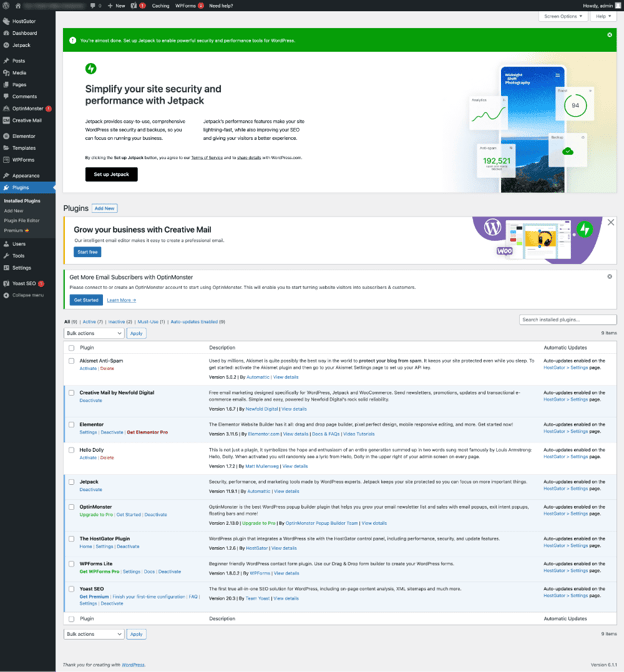
Managing Plugins
To manage your plugins, go to Plugins > Installed Plugins. From there, you can activate, deactivate, or delete a plugin. You can also configure the settings of each plugin by clicking on Settings or Edit.
Popular WordPress Plugins
Yoast SEO: Yoast SEO is a powerful plugin that optimizes your website for search engines by analyzing your content, meta tags, and sitemaps. It offers features such as XML sitemap generation, readability analysis, and social media optimization. The plugin helps improve your website's search engine rankings, resulting in more traffic and better visibility.
Contact Form 7: Contact Form 7 is a simple and flexible plugin that allows you to add contact forms to your WordPress site. It offers customization options for fields, email messages, and form submission messages. The plugin supports Akismet spam filtering, CAPTCHA, and file attachment features.
WP Rocket: WP Rocket is a premium plugin that speeds up your WordPress site by caching pages, minifying files, and optimizing images. It offers features such as lazy loading, database optimization, and CDN compatibility. The plugin can significantly improve website performance, resulting in faster page load times and better user experience.
WPForms: WPForms is a user-friendly plugin that allows you to add customizable forms to your WordPress site, including contact forms, payment forms, and survey forms. It offers drag-and-drop functionality, form templates, and integration with popular email marketing services. The plugin helps improve user engagement and conversion rates by providing a seamless user experience.
WP Mail SMTP: Is a plugin that allows you to send WordPress emails using an SMTP server, improving email deliverability and avoiding spam filters. It offers features such as easy SMTP setup, email logs, and notification options. The plugin helps ensure that your emails reach their intended recipients, resulting in better communication with your website users.
Jetpack: Jetpack is a versatile plugin that offers a suite of tools and features for WordPress, including site stats, security, backups, and more. It offers features such as site optimization, automated backups, and spam protection. The plugin helps improve website performance and security, resulting in better user experience and peace of mind for website owners.
UpdraftPlus: UpdraftPlus is a plugin that backs up your site's files and database to a cloud storage service or your computer. It offers features such as automated backups, manual backups, and encryption options. The plugin helps ensure that your website data is safe and easily recoverable in case of an unexpected issue.
MonsterInsights: MonsterInsights is a plugin that tracks your site's analytics, including pageviews, bounce rate, and conversion rate. It offers features such as easy Google Analytics integration, custom reports, and real-time tracking. The plugin helps website owners make data-driven decisions to improve their website's performance and user experience.
Elementor: Elementor is a drag-and-drop page builder plugin that allows you to design custom layouts and templates for your WordPress site. It offers features such as pre-designed templates, responsive design, and custom widgets. The plugin helps website owners create unique and professional-looking websites without the need for extensive coding knowledge.
Akismet: Akismet is a plugin that protects your site from spam comments by filtering them out automatically. It offers features such as comment moderation, spam filtering, and statistical reports. The plugin helps improve website security and user experience by eliminating unwanted comments and preventing potential security risks.
WooCommerce: WooCommerce is a plugin that transforms your WordPress site into an eCommerce platform, allowing you to sell physical and digital products, services, and subscriptions. It offers features such as product management, payment gateway integration, and shipping options. The plugin helps website owners create and manage online stores, resulting in additional revenue streams and better customer experience.
How to Install a WordPress Plugin using FTP
You may wonder, why on earth would I want to install WordPress plugins via file transfer protocol (FTP) when I can easily install them through the dashboard. There may be times when you’re unable to access your dashboard. Another use case is if you’ve modified files within plugins and themes. Or, if you’re trying to update a plugin but updating failed through the dashboard.
Installing a WordPress plugin using FTP is a simple process that requires some basic technical knowledge. Here's a step-by-step guide:
-
Download the Plugin
Download the plugin you want to install to your computer from the WordPress repository or from a third-party source.
-
Extract the Files
Extract the plugin files from the zip archive to a new folder on your computer.
-
Connect to FTP
Connect to your server using an FTP client, such as FileZilla. Enter your FTP credentials to access your site's root directory.
-
Navigate to the Plugins Folder
Navigate to the wp-content/plugins folder on your site using the FTP client.
-
Upload the Plugin
Upload the extracted plugin folder to the plugins directory on your site.
-
Activate the Plugin
Go to your WordPress dashboard and click on Plugins > Installed Plugins. Find the plugin you just uploaded and click on Activate.
-
Configure the Settings
Configure the settings of the plugin by going to the plugin's settings page. This varies depending on the plugin, so refer to the plugin documentation for instructions.
How to Configure and Deploy a WordPress Plugin
Once you've installed a WordPress plugin, you'll need to configure it and deploy it on your site. Follow these steps to configure your plugin.
-
Go to the Plugin Settings
Go to the plugin settings page by clicking on Plugins > Installed Plugins in your WordPress dashboard. Find the plugin you want to configure and click on Settings or Configure.
-
Configure the Settings
Configure the plugin settings according to your preferences. This varies depending on the plugin, so refer to the plugin documentation for instructions.
-
Test the Plugin
Test the plugin to ensure that it's working correctly. If you encounter any issues, refer to the plugin documentation or contact the plugin developer for support.
-
Deploy the Plugin
Once you've configured and tested the plugin, you can deploy it on your site. Depending on the plugin, this may involve adding a shortcode to a page or post, adding a widget to a sidebar, or modifying your site's code.
Can’t Find the Perfect Plugin? Create Your Own
With over 60,000 plugins it’s hard to think of a plugin that hasn’t been created but it is possible. You may have the next great plugin idea or a niche plugin serving a small subset of users. If you’re unable to find one, consider having one developed. WordPress is a very popular platform built using common Hypertext Preprocessor (PHP) scripting language. And since WordPress powers 46% of all websites globally there are plenty of developers who can meet your needs.
Resources for Developing Custom Plugins
Here are some popular resources where individuals can go to hire developers to develop custom WordPress plugins:
- Upwork - a freelance marketplace that allows you to hire WordPress developers on an hourly or project basis.
- Freelancer - a platform that connects businesses with freelance developers, including WordPress experts.
- Codeable - a curated network of WordPress developers that specialize in custom plugin development.
- Toptal - a network of pre-vetted freelancers and agencies, including WordPress developers.
- Fiverr - a platform that allows you to hire WordPress developers for custom plugin development and other WordPress-related tasks.
- PeoplePerHour - a freelance platform that connects businesses with WordPress developers for custom plugin development and other WordPress-related tasks.
- WPMU DEV - a WordPress support and development company that offers custom plugin development services.
- 99designs - a platform that connects businesses with freelance designers and developers, including WordPress experts for custom plugin development.
- Guru - a freelance platform that allows businesses to find WordPress developers for custom plugin development and other WordPress-related tasks.
- WordPress.org - the official WordPress repository that allows you to find and hire WordPress developers for custom plugin development.
Tips for Choosing the Right WordPress Plugin Developer
Evaluating a WordPress developer before hiring is important to ensure that you are working with a skilled and reliable professional. Here are some ways to evaluate a WordPress developer before hiring:
- Portfolio - Review the developer's portfolio to see examples of their previous work. Look for websites or plugins that are similar in complexity and functionality to what you're looking for.
- Reviews and ratings - Look for reviews and ratings of the developer on freelance marketplaces, such as Upwork, Freelancer, and Codeable. Check the ratings and reviews left by previous clients to see if the developer has a track record of delivering quality work.
- Technical skills - Assess the developer's technical skills by asking them to explain their approach to solving a specific problem or how they would implement a specific feature. Ask for code samples or previous projects to review their coding skills.
- Communication skills - Evaluate the developer's communication skills by discussing the project scope and timeline, and how they will communicate progress and updates throughout the project.
- Professionalism - Assess the developer's professionalism by checking their response times, how they handle conflicts or issues that arise during the project, and their overall attitude and demeanor.
- Price - Evaluate the developer's pricing structure and compare it with other developers in the same category. Be wary of developers who offer extremely low prices, as this may indicate lower quality work.
By evaluating a WordPress developer before hiring, you can ensure that you're working with a skilled and reliable professional who can deliver quality work on time and within budget.
Final Thoughts
Plugins are an essential part of WordPress, allowing you to add new features and functionality to your site without the need for coding. By installing and managing the right plugins, you can improve your site's SEO, enhance user experience, and add new revenue streams. Always remember to choose plugins that are updated regularly, have good reviews, and are compatible with your WordPress version.