
23 Must-Have Chrome Extensions for Web Professionals


As I was running some analytics reports early this week, I checked in on the number of visitors with the Chrome browser. Much to my surprise, the percentage has nearly tripled year over year to nearly 10% of all unique visits. That's pretty impressive, and its relative success could in part be attributed to the activity in extensions, which provide users with more features and functionality to the browser (just like Firefox add-ons).
While you may not be a Chrome user today, perhaps the extensions below will help change your mind. Let's look at what we consider to be 23 must-have Chrome extensions for Web professionals.
Some Chrome Extensions for Web Designers
You might also want to check out how your site design appears for those using advertising blockers such as AdBlock or AdThwart. Checking a site for how it appears to users with extensions like FlashBlock (which automatically blocks flash content on web pages) is important as well.
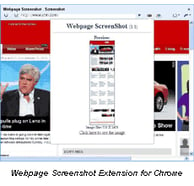 It's not just the ads that users might be blocking. IE Tab by Blackfish Software displays web pages using IE in a tab and is another must-have extension. Great for web developers who want to test the IE rendering engine, users who visit sites with ActiveX controls, and those who want to use the explorer view for local files (i.e. file:// URLs). Another of my favorite design-related extensions for Chrome is Webpage Screenshot which lets you save JPG screenshots of a whole Web page. Another option is Aviary Screen Capture which lets users take a screenshot of a webpage and edit it directly within a browser with Aviary.com applications.
Social Sharing Extensions for Chrome
The Google Share Button enables Web professionals to share web pages to social networks, emails, etc. using the click-to-share button. Again, nothing really groundbreaking, but certainly useful. If the thought of having one Google product embedded in another Google product is too much for you, check out the virtually identical Shareaholic. While those are two excellent extensions, I still prefer this Ping.fm extension myself.
Should you keep your social sharing to a minimum, there are some extensions for individuals sites. The official Digg extension for Chrome shows the Digg count for any URL (displayed next to the address bar). Clicking the icon displays the title and comment count for the URL and provides a button to Digg it remotely. The Delicious for Google Chrome extension lets users keep, share and discover sites using the Delicious Web service. If you are only looking for a URL shortening service, consider the Bit.ly extension.
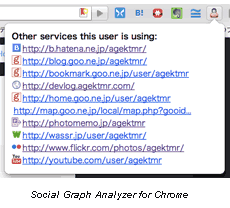 Perhaps the best of the social sharing extensions for Chrome is the Social Graph Analyzer, which lets you discover profile pages whose owner is simular to the page you are currently browsing.
And of course, no article would be complete without at least a few Twitter extensions worked in for good measure. Chromed Bird is an extension that allows you to follow timelines and interact with your Twitter account plus quite a few additional features including previewing. Another excellent and very powerful Twitter client to consider is Chrowety.
Chrome Extensions for Developers
Speed Tracr is another official Google extension for Chrome that helps web developers identify and fix performance problems in applications such as JavaScript parsing and execution, layout, CSS style, network resource loading, DOM Event handling and more. This is perhaps the best extension currently in the market for developers. Another exceptional extension for Chrome is Firebug Lite, a tool that allows for the editing, debugging and monitoring of CSS, HTML, and JavaScript live in any web page. This is an unsupported port of Firebug Lite for Chrome.
I am not really sure where to put this next extension but under the "developer" category is probably as good as anywhere. Proxy Switchy is an advanced proxy manager for Chrome that allows users to manage and switch between multiple proxy profiles.
Chrome Research and Writing Extensions
 The
Google Similar Pages extension could prove to be useful, as it shows pages similar to the one being visited. Couple that with the
Zemanta extension for Chrome
and access contextual suggestions, affiliate linking support, re-blogging support, and filtering of suggested images for copyright. Another extension that facilitates greater productivity in content development is the
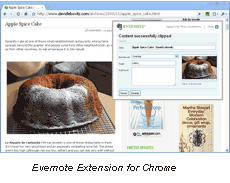
Evernote Web Clipper, which lets users save content they see while browsing the Web and access those clips in the cloud.
The
Google Similar Pages extension could prove to be useful, as it shows pages similar to the one being visited. Couple that with the
Zemanta extension for Chrome
and access contextual suggestions, affiliate linking support, re-blogging support, and filtering of suggested images for copyright. Another extension that facilitates greater productivity in content development is the
Evernote Web Clipper, which lets users save content they see while browsing the Web and access those clips in the cloud.
Editors Note: Another Chrome extension that we overlooked (and that is definitely worthy of a mention) is Surf Canyon. The extension automates the discovery of relevant information in search results on Google, Yahoo!, Bing and Craigslist.
SEO Extensions for Chrome
Chrome SEO is an extension that offers some good SEO tools and resources, including how many pages are indexed in current search engines, the number of back-links, current traffic and rankings, bookmarks, cached versions, domain details and a lot more. Chrome SEO has over 100,000 users, making it one of the most popular extensions in the market. Another extension to provide some useful information on search engine optimization is SEO by Sean Bannister, who also created the Chrome SEO extension. The SEO extension is really just a rewrite of David Naylor's SEO Playground tool, released as a Chrome extension.Cool Productivity Extensions for Chrome
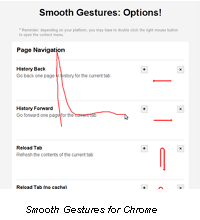 Mouse Stroke has to be the most brilliant of those featured in this article. The extension enables the use of mouse strokes as gestures in the browser. For example, designate a squiggly line to be the back button (or use the list of built-in strokes on the options page) on your browser. Another very strong contender among mouse gesture extensions is
Smooth Gestures.
Mouse Stroke has to be the most brilliant of those featured in this article. The extension enables the use of mouse strokes as gestures in the browser. For example, designate a squiggly line to be the back button (or use the list of built-in strokes on the options page) on your browser. Another very strong contender among mouse gesture extensions is
Smooth Gestures.
Do you have a favorite Chrome extension that we didn't cover? Or a Firefox add-on/extension that you'd like to see ported to Chrome? Share your comment below now!